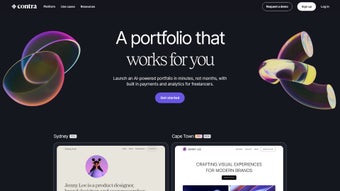

Download Contra – AI‑Driven Portfolio Management for Freelancers
Overview
Contra is an AI‑powered platform built specifically for freelancers who want a professional online presence without the hassle of coding or hiring a designer. In a crowded market of generic website builders, Contra stands out by offering a streamlined workflow that takes a freelancer from zero to a polished portfolio in minutes. The service includes a free “Sydney” template that is fully responsive, SEO‑friendly, and ready to showcase work samples, client testimonials, and service listings.
Beyond visual design, Contra integrates contract management, secure payment processing (with zero commission fees), and real‑time analytics that help users understand visitor behavior and conversion rates. Whether you are a graphic designer, developer, writer, or consultant, Contra’s AI engine suggests optimal layouts, copy tweaks, and even pricing recommendations based on industry benchmarks. The platform’s core promise is to let freelancers focus on their craft while the software handles the technical and business‑development side of an online portfolio.
By automating repetitive tasks—such as resizing images for different devices, generating meta tags for search engines, and drafting standard contracts—Contra reduces launch time, improves discoverability, and ultimately boosts revenue. The free tier provides enough power for a starter site, while the paid Contra Pro plan adds premium templates, priority marketplace placement, and deeper customization options. In short, Contra merges a website builder, invoicing system, and client‑relationship manager into a single, secure cloud‑based application that scales with the freelancer’s growth.
Key Features & Benefits
- AI‑Assisted Design: Automatically selects the best template, color scheme, and typography based on the freelancer’s niche and portfolio content.
- Zero‑Commission Payments: Integrated payment gateway that transfers funds directly to the freelancer’s bank or Stripe account without taking a cut.
- Contract Management: Built‑in contract templates, digital signatures, and version control keep client agreements organized.
- Advanced Analytics Dashboard: Track page views, click‑through rates, and client acquisition sources to refine marketing strategies.
- Priority Search Visibility (Contra Pro): Pro users receive boosted placement in Contra’s internal marketplace, increasing discovery by potential clients.
- Customizable Templates (Pro): Access to a library of premium, fully editable templates that can be tailored with custom CSS or branding assets.
- Free “Sydney” Template: A high‑quality starter theme that includes sections for services, portfolio galleries, and a contact form.
- Secure Hosting & SSL: All sites are hosted on a secure cloud infrastructure with automatic SSL certificates.
- Multi‑Device Responsiveness: Portfolios look flawless on Windows, macOS, Android, and iOS devices.
- Regular Updates: AI models and template libraries are refreshed monthly to keep the platform current with design trends.
These features collectively reduce the time‑to‑launch for a freelance portfolio from weeks to under an hour. The AI suggestions also help non‑designers avoid common visual mistakes, while the analytics and contract tools turn the website into a mini‑CRM, enabling freelancers to manage leads, close deals, and get paid without third‑party platforms. Because the payment system is commission‑free, freelancers retain every cent of their earnings, only paying the standard processing fee charged by Stripe or PayPal.
The built‑in contract module eliminates the need for separate legal software, and the automatic SSL encryption assures clients that their data is safe. Moreover, the regular update cycle guarantees that the latest SEO best practices are baked into every site, helping freelancers rank higher in search results without extra effort. Whether you are just starting out or you have an established client base, Contra’s layered feature set scales with your business, offering a free entry point and a clear upgrade path for growing professionals.
Installation, Usage & Compatibility
Getting Started in Three Simple Steps
- Sign Up & Choose a Template: Visit the Contra website, create a free account, and select the “Sydney” template or any Pro template if you have upgraded.
- Populate Your Portfolio: Use the drag‑and‑drop editor to add project images, descriptions, and client testimonials. The AI assistant will recommend copy refinements and layout tweaks in real time.
- Publish & Connect Payments: Click “Publish,” and your site is live on a secure Contra subdomain (or a custom domain you own). Link your Stripe or PayPal account to start receiving commission‑free payments.
Contra is a cloud‑based SaaS solution, so there is no traditional “installation” on a local machine. All you need is a modern web browser (Chrome, Firefox, Safari, or Edge) and an internet connection. The platform automatically saves changes, so you can work from any device—desktop, laptop, tablet, or smartphone. Because every edit is stored in the cloud, you never have to worry about version control or losing work after a power outage. The editor also supports keyboard shortcuts, bulk image uploads, and real‑time preview, making the creation process as fluid as using a native design application.
Operating System Compatibility
- Windows 10/11 – Fully supported via any current browser.
- macOS Catalina and later – Optimized for Safari and Chrome.
- Linux distributions – Works in Chrome, Firefox, and Chromium‑based browsers.
- Android 8.0+ – Mobile‑friendly editor and preview mode.
- iOS 13+ – Responsive design editor available in Safari and Chrome.
Because Contra runs entirely in the cloud, updates and security patches are applied automatically, ensuring you always have the latest AI models and feature set without manual intervention. For freelancers who prefer a custom domain (e.g., yourname.com), Contra provides DNS configuration guides for popular registrars, making the transition seamless. The platform also offers two‑factor authentication (2FA) and role‑based access controls for teams, so you can safely share editing rights with collaborators while keeping sensitive financial data protected.
Pros, Cons, FAQ & Final Thoughts
Pros
- AI‑driven design eliminates the need for graphic design skills.
- No commission fees on payments, saving freelancers up to 10% per transaction.
- Integrated contract and payment tools create an all‑in‑one business hub.
- Responsive templates work across Windows, macOS, Android, and iOS.
- Free starter template makes it low‑risk to test.
- Monthly AI model updates keep the platform current with design trends.
- Secure SSL hosting protects client data and improves SEO.
Cons
- Advanced customization (custom CSS/JS) is limited to Pro users.
- Marketplace visibility boost is only available with a paid plan.
- Reliance on internet connectivity; offline editing is not possible.
- Free tier includes Contra branding on the subdomain.
- Support for free users is limited to community forums.
Frequently Asked Questions
-
Is Contra really free to use?
Yes, the basic “Sydney” template and core features are free forever. You only pay if you upgrade to Contra Pro for premium templates, priority search placement, and advanced customization.
-
Can I use my own domain?
Absolutely. Contra allows you to connect any custom domain you own, and the platform provides step‑by‑step DNS instructions for major registrars.
-
How does the payment system work without commissions?
Contra integrates directly with Stripe or PayPal. The platform does not add a markup; you only pay the standard processing fees charged by the payment provider.
-
Is there any AI learning curve?
The AI works in the background, offering suggestions as you type or upload assets. There’s no training required—simply accept, tweak, or reject the recommendations.
-
What kind of support does Contra offer?
Free users receive community forum access and a knowledge base. Pro users get priority email support and live chat during business hours.
-
Can I export my site data?
Yes. Contra allows you to download a JSON backup of your portfolio content, which can be imported into another Contra account or a compatible website builder.
Conclusion & Call to Action
For freelancers who want a sleek, AI‑enhanced portfolio without juggling multiple tools, Contra delivers a compelling package. The free tier is generous enough to launch a professional site quickly, while the Pro upgrade adds depth for power users. With zero‑commission payments, built‑in contract handling, and actionable analytics, Contra transforms a simple showcase into a revenue‑generating hub. If you’re ready to stop worrying about design minutiae and start focusing on client work, download Contra today and experience the future of freelance portfolio management.



.png)



